BookWalker
- 1.6
- Rating
- 10.00K
- Installs
- Free
- Price

 Analysis by App-foxy
BookWalker is the kind of comics app that looks most appealing when you already know what you want to read. I approached it as a first-time reader, expecting a simple way to browse manga and light novels, pick a title, and start reading without having to learn a complicated system. That basic promise is clear, but the experience also has a few rough edges that are important to understand before you commit to it.
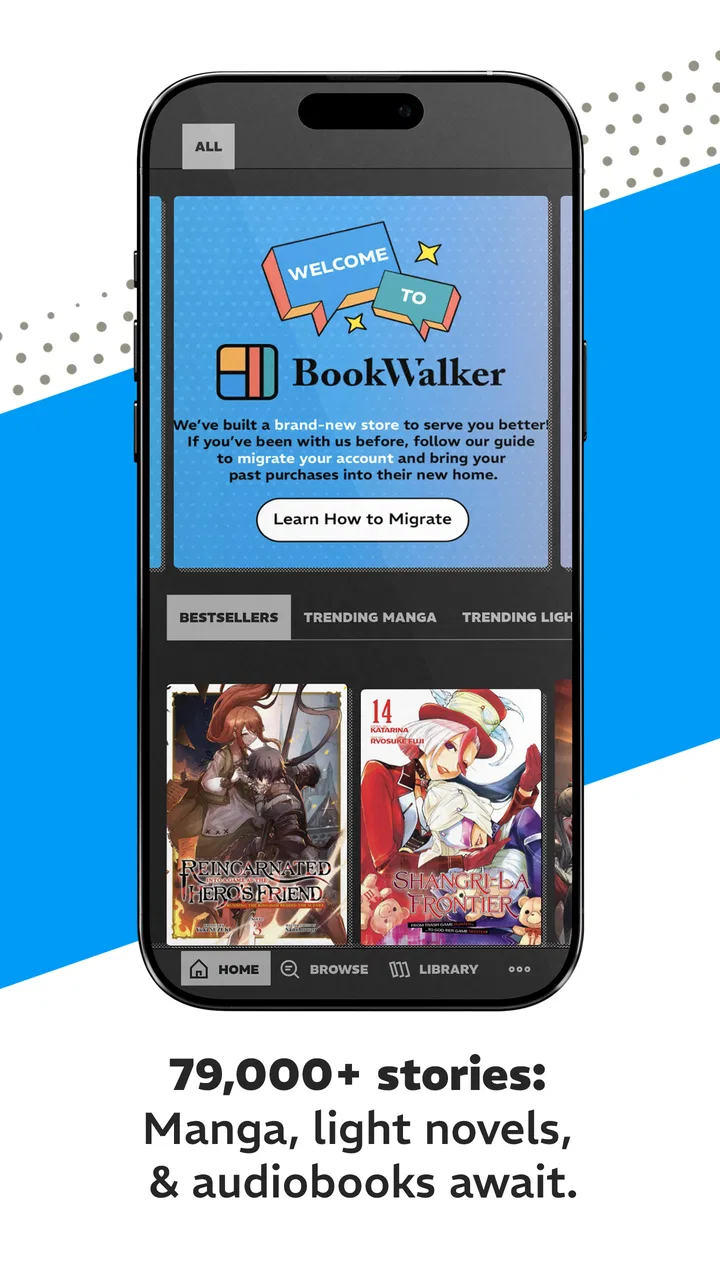
Developed by M12 Media, this free comics app presents a very large official catalog, with more than seventy-nine thousand manga and light novels available to explore. That scale is its strongest attraction. Instead of treating comics as a small side feature, BookWalker is built around making a broad reading library the center of the experience. The Teen content rating also gives a useful first impression: this is aimed at older children, teenagers, and adults rather than very young readers.
My overall reaction is mixed. I like the idea of having official manga and light novels gathered in one place, and the app can be worthwhile for readers who enjoy discovering series beyond the most visible mainstream choices. However, the current average rating is only 1.6 from around four hundred ratings, with roughly two hundred written reviews. That is a serious warning sign for anyone expecting a polished, effortless reading service. I would treat BookWalker as an app to test carefully, not as an automatic replacement for every comics reader already on your phone.
You May Also Like

 Blood Strike: 2.5 Anniversary
Blood Strike’s Loadouts Turn Every Drop Into a Tactical Gamble
A close look at Blood Strike’s custom loadouts: how fast access to signature weapons reshapes its battle royale rhythm, rewards preparation, and narrows the gap between fights.

 Pandora - Music & Podcasts
Pandora’s Music Is Easy to Start, but Harder to Recover
Pandora’s strength is its low-effort path from a seed to a station. Its weak spot is how much confidence it asks you to place in connection, setup, and quiet recovery.

 8 Ball Pool
8 Ball Pool Is Built on Rivalries, Rematches, and Routine
A close look at the rivalries, rematches, shared routines, and unanswered safety questions that turn a quick pool match into a persistent mobile community.

 Samsung Music
Samsung Music’s Quiet Strength Is Playing What You Already Own
Its reach comes less from spectacle than from dependable access to a personal library. That simplicity is both the app’s strongest retention engine and its ceiling.

 AccuWeather: Weather Radar
AccuWeather Review: A Quick, Clear Forecast for Everyday Decisions
For everyday plans, the best forecast is the one you can understand quickly. AccuWeather makes rain timing, radar, and local conditions easy to act on, with a few trade-offs.

 Hill Climb Racing
Why Hill Climb Racing Still Turns Crashes Into One More Run
A tiny car, a bumpy hill and one more upgrade: Hill Climb Racing keeps resurfacing because its simple chaos makes every near-miss feel personal.
More From Our News Desk



Getting from installation to your first useful reading session
I’d make the first session a small, deliberate test rather than a long browse: choose one familiar manga or light novel, check the exact volume, and see how naturally you reach the reading screen. That gives you a useful baseline for judging the catalog and navigation before you spend time comparing unfamiliar titles.
What to expect before you begin
The first thing to keep in mind is that BookWalker is not simply a comic viewer filled with files you already own. Its value depends on browsing its own official library and finding something that matches your taste. That changes how I would use it compared with a basic reader app. A local reader is useful when you already have legally obtained files and want a comfortable place to open them. BookWalker is more useful when you want a storefront-style discovery experience built around manga and light novels.
The app is free to install, which makes trying it relatively low-risk at the start. It does include in-app purchases ranging from $0.99 to $99.99 per item, so the word “free” should be understood as free access to the app rather than a promise that every book is free. I would not add payment details until I had checked how the particular title I wanted was offered and whether the reading experience suited me.
That distinction matters for families too. The Teen rating is not a guarantee that every title will feel appropriate for every teenager. Manga and light novels cover many genres and levels of maturity, so I would still look at each book individually. If you are setting this up for a younger reader, browsing together at first is a sensible way to establish which series fit your household.
BookWalker runs on Android 7.0 and later, which keeps the compatibility requirement fairly broad for Android users. The current version is 26.08.16. If you are using an older phone, I would still pay attention to how smoothly the catalog and reading screens behave, because a compatible operating system does not automatically mean every device will feel equally responsive.
The first setup is easier when you decide what you want to find
My advice is to install BookWalker with a small goal instead of opening it with the vague plan to “see what is there.” The catalog is large enough that unstructured browsing can become tiring. Before launching it, choose one of three starting points: a known series, a favorite genre, or a light novel you have been meaning to try. That simple decision gives you a way to judge the app on something concrete.
On the first pass, I would spend a few minutes learning how the catalog presents titles rather than immediately buying anything. Look at how the app separates or displays manga and light novels, how title pages summarize a volume, and how easy it is to return to a book you noticed earlier. These small details tell you whether BookWalker fits your reading habits better than a general digital bookstore or a subscription-focused comics service.
A useful setup habit is to make a short mental shortlist. Keep one title that you already recognize, one unfamiliar title with an appealing description, and one light novel if that format interests you. This gives you a practical test of search, discovery, and format handling without wandering through the entire library. It also reduces the chance of spending money simply because a colorful cover caught your attention.
I would also check the account and purchase flow before settling in for a long reading session. The important question is not only whether a title looks available, but whether the steps from selecting it to opening it are clear. If the app makes you hesitate about what you are buying or where the book will appear afterward, stop and resolve that confusion first. A comics service should make the reading path obvious.
Your first successful action should be opening one complete sample of the experience
For me, the first meaningful success with BookWalker would be finding one title and reaching its reading screen without needing to search through several unrelated menus. That is a better test than simply installing the app or scrolling through covers. Once a book opens, take a moment to see whether the page presentation feels comfortable on your phone. Manga and light novels place different demands on a reader, so the same app can feel fine for one format and less natural for the other.
If you are starting with manga, test the basic rhythm of reading: move forward, move back, pause on a detailed panel, and return to the catalog. Do not judge the entire service from the cover or description alone. The real question is whether the app lets you stay focused on the page instead of making navigation feel like work. For a light novel, pay attention to whether the text feels easy to follow during a normal reading session rather than only during a quick preview.
A realistic everyday use case would be a short evening break after work or school. I would search for a familiar series, open the volume, read for ten minutes, and then leave the app. On the next visit, I would check whether returning to that title feels straightforward. This test exposes a practical issue that store summaries rarely explain: a large catalog is helpful only if you can reliably get back to the story you were reading.
Another useful test is to deliberately stop before finishing a chapter or section. Close the app, do something else, and return later. You are checking the continuity of your personal reading routine, not just the quality of the catalog. If the app makes you spend too much time remembering where you were or locating the same title again, that friction will matter more over several weeks than the excitement of the first browse.
I would not use an expensive purchase as the first test. Start with the least costly meaningful option available to you, or with content that lets you understand the app before you spend more. Because individual purchases can reach $99.99, a cautious approach is especially sensible. The best first session ends with confidence that you understand what you are selecting, where it will be found, and whether you actually enjoy reading it there.
Where new users may become confused
The biggest likely source of confusion is the difference between a huge catalog and a single all-you-can-read shelf. BookWalker’s headline appeal is the breadth of its official manga and light novel collection, but that does not mean the same access model applies to every title. I would read the title page carefully and treat each purchase or access choice as its own decision.
Another point that can catch people is the difference between discovering a series and choosing a specific volume. A search result may lead you to a franchise with several entries, while the action you take may apply only to one book. Before confirming anything, I would check the exact title and volume, especially when several covers look similar. This habit is simple, but it prevents the most frustrating kind of digital reading mistake: obtaining a different part of the story than the one you intended.
Readers also need to separate the app’s catalog from their own reading library. Browsing a title and having access to it are not necessarily the same step. If you find something interesting, note what action adds it to your personal collection and what action merely displays information. That distinction is worth learning early because it affects how quickly you can return to a book later.
The low average rating should influence how patiently you troubleshoot. If a screen feels unclear, do not assume you are doing something wrong immediately. Try backing out to the title page, reopening the book, and repeating the action more slowly. I would also avoid making several purchases during the first session, since that makes it harder to tell whether a problem comes from navigation, a particular title, or the account flow.
There is a further trade-off between breadth and simplicity. A catalog with over seventy-nine thousand official choices sounds exciting, but it can also create decision fatigue. I would use a short list of genres or authors and stop browsing once I have two or three realistic candidates. The goal is to read, not to turn the app into an endless catalog tour.
How it compares with the usual alternatives
BookWalker sits between several familiar kinds of reading tool. Compared with a local comic reader, it offers a more direct path to discovering official manga and light novels, but a local reader may feel more predictable when you already have your own files. Compared with a general ebook store, BookWalker is more focused on Japanese comics and related prose, which can make it a better starting point for a dedicated fan than a broad bookstore with a mixed catalog.
Subscription-based comics services may be more attractive to readers who prefer a fixed monthly routine and want to sample many titles before deciding what to continue. BookWalker can make more sense for someone who wants to select particular official volumes and build a focused collection. The better choice depends on whether you value ownership-style selection or broad, ongoing sampling.
Free web reading platforms may also feel easier for casual browsing, especially when you want to read a chapter immediately without thinking about a purchase. The trade-off is that a dedicated storefront can be more useful when you are trying to follow a specific series or find official editions. I would choose BookWalker over a general reading app when the exact manga or light novel I want is available and the purchase terms are clear.
On the other hand, I would skip it as my main option if I mostly read comics from files stored on my device, need a very minimal viewer, or dislike browsing a large commercial catalog. I would also be cautious if the poor average rating reflects problems you encounter during your own first session. A broad selection cannot compensate for an unstable or confusing reading routine.
Practical ways to get more from the catalog
One non-obvious advantage of a large specialist catalog is that it can help you use a two-stage discovery method. First, search for a series you already know. Then use nearby recommendations, related categories, or the publisher-style context around that title to find something unfamiliar. This is more efficient than starting from the entire catalog, because your known series acts as an anchor.
A second useful approach is to separate “research reading” from “comfort reading.” Use the app’s browsing time to identify a few possible books, but reserve your actual reading session for one selected title. Mixing constant searching with reading makes it difficult to decide whether you enjoy the content or merely enjoy the act of collecting possibilities.
For light novels, I would be especially deliberate about testing the format during a normal uninterrupted session. Someone who usually reads manga may assume the same habits will transfer immediately, but prose asks for a different pace and different screen comfort. If the app serves both formats, that variety is valuable, yet it also means your opinion should be based on the format you actually plan to use most.
For manga, try reading in the position you normally use at home rather than only holding the phone close while standing. Panel detail, page flow, and the effort required to move through a volume become more noticeable after several minutes. This is the sort of practical check that can save you from buying several books before realizing that your preferred reading setup does not suit the app.
I would also keep purchases tightly connected to a reading plan. If you know you will read one volume this weekend, choose that volume. If you are collecting a long series, decide how many books you realistically finish before buying further. The available purchase range makes impulse decisions easy, while a simple reading plan keeps BookWalker useful instead of turning it into an expensive digital shelf.
Who should install it, and who should look elsewhere
I can recommend trying BookWalker to a manga reader who wants a focused official catalog, enjoys discovering less obvious titles, and is comfortable evaluating books individually. It is also worth considering for someone who reads both manga and light novels and prefers those formats to live within the same specialist app. The free installation makes that first experiment accessible, provided you approach purchases carefully.
I would be less enthusiastic for a reader who expects every title to be included at no extra cost, wants a completely frictionless interface, or needs a simple reader for an existing personal collection. The in-app purchase range and the low average rating mean that expectations should stay realistic. If the first setup feels confusing or the reading screen does not suit you, there is no reason to force yourself through a large catalog.
Parents should treat the Teen rating as a starting point for supervision rather than a substitute for checking individual books. The app’s subject area is broad, and a teenager’s reading preferences can vary widely. A shared first browsing session is a practical way to decide whether the available titles match the reader’s age and interests.
My next-step recommendation
My suggested path is simple: install BookWalker, choose one known manga or light novel, inspect the exact title and volume, and complete one short reading session before making a larger commitment. Then close and reopen the app to see whether returning to that book feels natural. If that process is clear and the reading experience is comfortable, explore the wider catalog gradually rather than buying several titles at once.
BookWalker has a strong reason to exist: it gives specialist comics readers a place to search through an unusually broad official selection. That is meaningful, especially when you are tired of finding only the same popular recommendations elsewhere. But the app’s low 1.6 average and the presence of purchases up to $99.99 make a measured trial more sensible than an enthusiastic spending spree.
After using it as a first-time reader, I see it as a potentially useful discovery and purchasing app rather than a universal answer for everyone who reads comics. The best way to judge BookWalker is to test one complete path from search to reading before building a library. If that path works for your habits, the catalog may keep rewarding your curiosity. If it does not, a simpler local reader, a broader ebook store, or a subscription service may be a better fit.
BookWalker is free, aimed at Teen users, and maintained by M12 Media, with support for Android 7.0 and later. Those details make it easy to try, but the real decision comes down to your reading style: do you want a specialist catalog with individual purchase choices, or do you want the simplest possible way to open and read books you already have? For the first group, I think it deserves a careful test. For the second, I would look elsewhere.
FAQs for BookWalker
01What is BookWalker, and what kind of content can I read on it?
BookWalker is a digital reading platform focused primarily on manga, light novels, and selected ebooks. Its catalog varies by country, but readers can usually find popular Japanese series, new releases, exclusive editions, and titles from well-known publishers. Before downloading, check whether the books you want are available in your region, since licensing restrictions can affect the selection and release dates.
02Is BookWalker free to download and use?
The BookWalker app is generally free to download, and creating an account does not usually require an upfront payment. However, most full manga volumes, novels, and premium editions must be purchased individually or obtained through promotions. The app may also offer free previews, limited-time discounts, coins, or rewards, so it is worth reviewing the final price and purchase conditions before completing an order.
03Can I read BookWalker titles offline after purchasing them?
In many cases, purchased books can be downloaded inside the BookWalker app for offline reading, which is useful during travel or when your internet connection is unreliable. You normally need to sign in and download the title first. Offline access may depend on the app, device, and licensing rules, and downloaded books are generally intended to be read through BookWalker rather than exported as ordinary files.
04Can I use the same BookWalker account on Android, iPhone, and other devices?
BookWalker accounts can generally be used across supported devices, allowing your eligible purchases and reading library to remain connected when you sign in with the same account. Some features, store regions, and payment options may differ between platforms. It is important to select the correct BookWalker regional service and verify that your purchases are associated with the account you intend to use.
05Does BookWalker include DRM or restrictions on purchased books?
Yes, BookWalker content is commonly protected by digital rights management, meaning purchased books are designed to be read within supported BookWalker applications or services. This helps publishers protect their licenses but limits the ability to transfer, edit, or open titles in other ebook readers. Availability, downloads, and account access can also be affected by regional licensing and service policies.
Pros
- Large selection of licensed manga
- light novels
- and digital comics
- Frequent discounts
- promotions
- and free preview chapters
- Purchases sync across supported devices with one account
- Clean reader with adjustable brightness
- zoom
- and page direction
- Official releases support creators and publishers directly
Cons
- Availability of titles and translations varies by country
- Some books use DRM and cannot be read in other apps
- Offline downloads can require considerable device storage
- The catalog focuses mainly on Japanese comics and light novels
- Account and regional store restrictions may limit purchases

BookWalker
Gallery